Once you have access to a NetBird management server, you are ready to begin setting up your mesh VPN network.
The FRIDGE deployment controls the movement of traffic within the FRIDGE itself, but you will also need to configure network access within NetBird.
FRIDGE will deploy with a NetBird agent present in the access cluster.
You need to make the agent become a peer on the mesh network.
You will need to provide a setup key at the time of deployment to automatically connect the agent to your mesh network.
Any device that will connect directly to the VPN network will need to become a peer on that network.
Use setup keys for this purpose.
We make use of Groups and Access Policies to control who can access which parts of the FRIDGE over the VPN.
Individual NetBird peers can be associated with Groups. A peer is allowed to access any other resource in Groups it is associated with.
Access Policies can be used to determine which Groups can connect to each other, in which directions traffic can flow and on what ports and protocols.
We recommend creating three Groups, into each of which you will place one or more peers:
A Group for the NetBird peer in the access cluster (e.g.
fridge-access)A Group for TRE Administrator devices (e.g.
tre-admins)A Group for Job Submitter access (e.g.
tre-users)
Peers can be manually allocated to these groups after creation, or automatically allocated using setup keys.
Any TRE Administrators’ devices that are intended to be used for communication with the Kubernetes API of the isolated cluster should be allocated to the tre-admins Group.
Any device through which Job Submitters connect to the FRIDGE API should be allocated to the tre-users Group.
Inside the access cluster, traffic over NetBird is routed to its destination in the isolated cluster using HAProxy. Traffic on port 6443 will be routed to the Kubernetes API of the isolated cluster. Traffic on port 8000 will be routed to the FRIDGE API.
In the NetBird management console, create an access policy that allows traffic to flow from the tre-users group to fridge-access on port 8000.
Then create an access policy that allows traffic to flow from the tre-admins group to fridge-access on port 6443.
This setup is shown in NetBird access policies.
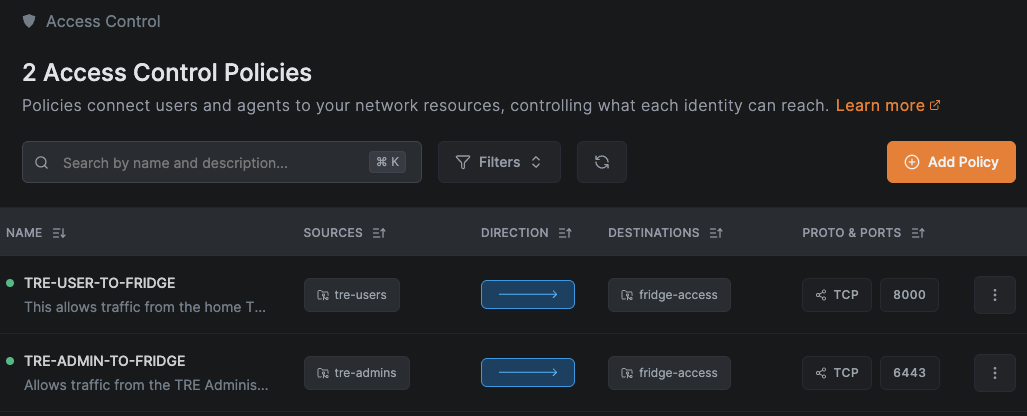
Connecting over the VPN
To connect to the FRIDGE over the VPN, you can use either the IP address or FQDN of the NetBird peer inside the FRIDGE from another registered peer. For example, if you are connecting as a TRE Admin to the internal K8s API of the isolated cluster, you can connect using
https://<access-peer-netbird-ip>:6443or
https://<access-peer-netbird-FQDN>:6443When intending to use the Kubernetes API through the VPN, you will need to modify your Kubernetes context.
We recommend using a copy of your original context.
Modify the server field to match either the NetBird IP address or FQDN, as appropriate.
Modify or add the tls-server-name: with the value localhost on Dawn, or the private Azure API FQDN when using AKS.
Pulumi stack configuration
Additional NetBird-specific configuration fields are required in the Pulumi configuration:
hostnamemanagement_urlsetup_keyendpoint_overrides
Non-secret values can be added to the configuration file manually or using pulumi config set --path "netbird.<field_name>" "<value>".
hostname should be a stable, descriptive name to be used for the peer in the access cluster (e.g. fridge-access-prod).
management_url is the URL for NetBird’s API server.
The management_url defaults to that of the NetBird Cloud API.
When using NetBird Cloud, additional NetBird servers (e.g. the signal or relay servers) are assumed to use the standard FQDNs for NetBird Cloud.
When using self-hosted NetBird, you should provide the URL of your NetBird server. By default, Pulumi will assume that all additional servers are hosted at the same URL, which is the default configuration for self-hosted NetBird.
setup_key should be a single-use key generated using the NetBird management console.
For convenience, we recommend that this key automatically adds the user of the key to the correct NetBird group.
setup_key should be encoded as a secret using the following command:
pulumi config set --secret --path "netbird.setup_key" "<setup_key_here>"
If you have separated out the NetBird services and allocated to them to different URLs, you can manually specify the correct FQDNs using endpoint_overrides:
fridge-access:netbird:
  endpoint_overrides:
    stun: stun.example.org
    relay: relay.example.org