Run a hyperparameter sweep
This guide walks through running a W&B sweep.
We use Optuna to sample the hyperparameters and we run each trial as an independent job.
Jobs are tracked in a local sqlite database, so switching platforms just involves copying the sweep directory.
Prerequisites
Complete the training prerequisites (W&B login) first.
1. Define the search space
Create a search-space YAML, e.g. example.sweep.yaml:
name: example
n_trials: 8
sampler: tpe
seed: 0
parameters:
  train.optimizer.lr:
    type: float
    low: 1.0e-5
    high: 1.0e-2
    log: true
  loss.delta:
    type: float
    low: 0.1
    high: 2.0
Every sweep is optimised against the trial's best validation_loss, taken from the training run's checkpoint callback; this is not configurable.
parameters keys are Hydra dotted override paths, exactly as you'd pass them to imp train key=value. Each entry is one of:
type: float/type: int—low,high, optionallylog: true(log-uniform) orstep.logandstepare mutually exclusive:type: intrequiresstep: 1(the default) whenlog: true, andtype: floatdoes not accept astepat all whenlog: true.type: categorical—choices: [...]
2. Generate the sweep
Note
--sweep-yaml is a full filesystem path, resolved relative to your current working directory (or given as an absolute path).
This is different from --config-name, which resolved relative to icenet_mp/config/.
This will create a new W&B sweep and a local directory under <base_path>/sweeps/<sweep_id>.
That directory contains the following files:
model_config.yaml: the baseimpconfigoptuna.yaml: the sweep configoptuna.db: a record of local trials (not human-readable)sampler.pkl: the state of the Optuna sampler (not human-readable)sampler.pkl.lock: a lock file governing concurrent access tosampler.pkl
3. Run a trial
This will run a single job registered as part of the W&B sweep.
4. Check results
All trials will create a W&B run which can be examined as usual. They will also create an entry in the W&B sweep which provides an easy comparison between all runs in the sweep.
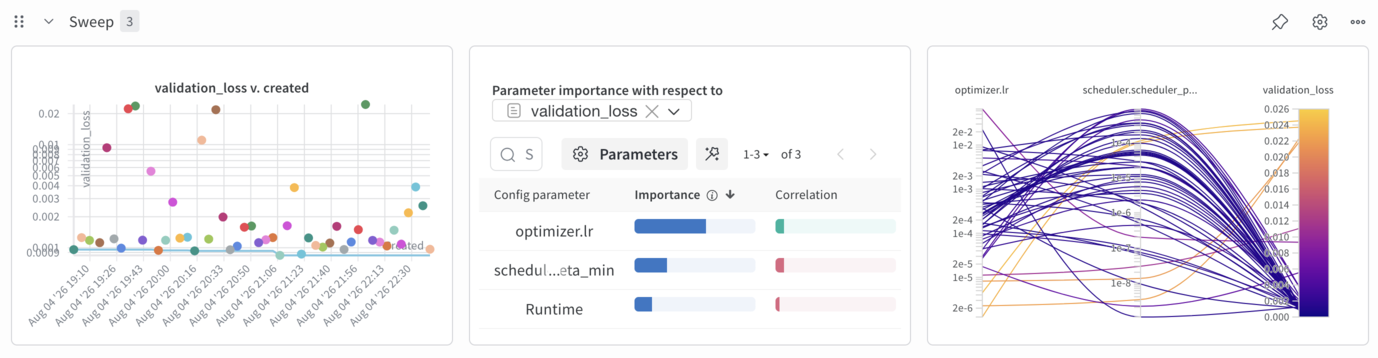
If you want to run additional trials in the same search space, simply run uv run imp sweep trial ... again.
If you want to refine the search space, you will need to create a new sweep with uv run imp sweep initialise ....
5. Summarise the best trial
This prints the number of completed trials and the value and hyperparameters from the best trial, read directly from the local Optuna study.
Unlike sweep trial, it does not need a W&B connection.